Hermes Agent 插件开发与生产实践
本章面向进阶用户:如何通过插件系统扩展 Hermes、如何从 OpenClaw 迁移,以及将 Hermes 部署到生产环境的安全与成本最佳实践。
插件开发入门
Hermes 支持三种类型的插件:通用插件(工具 + Hook)、记忆提供者、上下文引擎。
实例
bash
# 交互式管理已安装插件

hermes plugins

# 命令行管理

hermes plugins list

hermes plugins install <path>

hermes plugins enable <name>

hermes plugins disable <name>
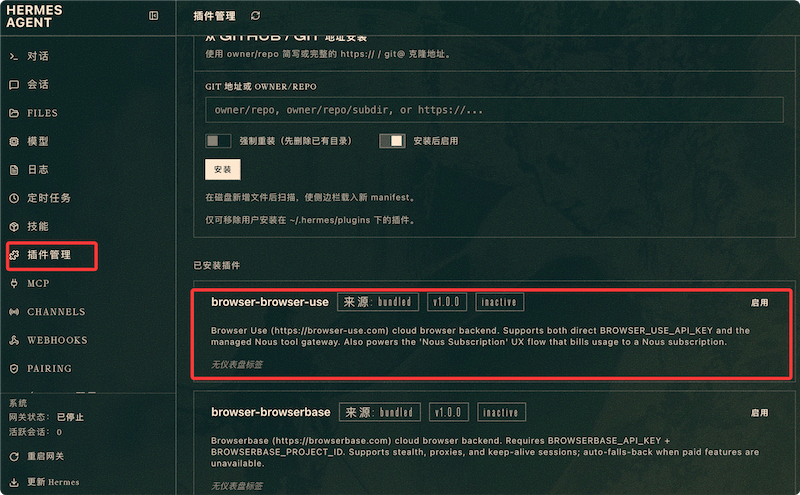
可以在仪表盘 管理插件,使用以下命令启动 Dashboard(仪表盘):
bash
hermes dashboard浏览器打开仪表盘,打开左侧插件列表,可以看到已安装的插件:
Hook 系统
最常用的插件能力是 Hook——在 Agent 生命周期的关键节点注入自定义逻辑:
实例
python
# 文件路径:插件目录/logging_plugin.py

# 简单插件示例:记录所有 LLM 调用

from hermes.plugins import Plugin, hook

class LoggingPlugin(Plugin):

    name = "logging-plugin"

    @hook("pre_llm_call")

    async def before_call(self, ctx):

        # 每次 LLM 调用前触发

        print(f"[LOG] 即将调用 LLM,当前上下文长度:{len(ctx.messages)}")

    @hook("post_llm_call")

    async def after_call(self, ctx, response):

        # 每次 LLM 调用后触发

        print(f"[LOG] LLM 调用完成,回复长度:{len(response.content)}")
可用的 Hook 点
| Hook | 触发时机 | 典型用途 |
|---|---|---|
| pre_llm_call | LLM 调用前 | 记录上下文、修改 Prompt |
| post_llm_call | LLM 调用后 | 记录响应、统计分析 |
| pre_tool_call | 工具调用前(可拦截/修改) | 权限校验、参数过滤 |
| post_tool_call | 工具调用后 | 结果审计、日志记录 |
| on_message_received | 收到用户消息时 | 消息预处理、敏感词过滤 |
| on_session_start | 会话开始时 | 初始化资源、注入上下文 |
| on_session_end | 会话结束时 | 清理资源、生成摘要 |
注册自定义工具
通过插件为 Agent 添加全新的工具能力:
实例
python
# 文件路径:插件目录/my_tools.py

# 注册自定义工具——Agent 可以像调用内置工具一样使用它

from hermes.plugins import Plugin

class MyPlugin(Plugin):

    name = "my-tools"

    def register_tools(self, ctx):

        # 注册自定义工具,Agent 在系统提示词中可见

        ctx.register_tool(

            name="my_custom_tool",

            description="这个工具做某件事,当用户需要 X 时使用",

            parameters={

                "type": "object",

                "properties": {

                    "input": {

                        "type": "string",

                        "description": "输入参数说明"

                    }

                },

                "required": ["input"]

            },

            handler=self.my_tool_handler

        )

    async def my_tool_handler(self, **kwargs):

        # 工具的实际执行逻辑

        input_text = kwargs.get("input", "")

        # ... 处理逻辑 ...

        return {"result": "done"}
从 OpenClaw 迁移
如果你正在使用 OpenClaw,官方提供了零停机迁移方案:
实例
javascript
# 导出 OpenClaw 配置

openclaw export --format hermes > openclaw-config.json

# 导入到 Hermes

hermes import --from openclaw openclaw-config.json

# 验证迁移结果

hermes doctor
主要概念对照
| 概念 | OpenClaw | Hermes |
|---|---|---|
| 代理定义 | JSON Agent 配置 | SOUL.md + config.yaml |
| 工作流程 | 手动编写 YAML 流程 | 技能(SKILL.md) |
| 记忆后端 | 外部数据库 | 内置 SQLite + 可插拔 |
| 技能/工具 | 代码插件 | Markdown 技能文件 |
| 多实例 | 多进程配置 | Profile 系统 |
生产环境最佳实践
安全清单
生产部署时的推荐安全配置:
实例
bash
# 文件路径:~/.hermes/config.yaml

# 生产环境推荐安全配置

terminal:

  backend: docker          # 必须:隔离 Agent 命令执行环境

approvals:

  mode: smart              # 危险命令需审批(或 manual 更严格)

  cron_mode: deny          # 定时任务遇到危险命令默认拒绝

security:

  redact_secrets: true     # 日志中自动脱敏敏感信息(默认开启)
环境变量中的访问控制:
实例
bash
# 文件路径:~/.hermes/.env

# 生产环境访问控制配置

GATEWAY_ALLOW_ALL_USERS=false           # 绝不允许所有用户

TELEGRAM_ALLOWED_USERS=你的用户ID       # 明确白名单
Token 成本控制
辅助任务使用更便宜的模型,大幅降低运营成本:
实例
bash
# 文件路径:~/.hermes/config.yaml

# 辅助任务使用独立模型,降低 Token 费用

auxiliary:

  background_review:

    provider: openrouter

    model: google/gemini-3-flash-preview    # 不必用主模型

  vision:

    provider: openrouter

    model: google/gemini-2.5-flash-preview

  session_search:

    provider: openrouter

    model: google/gemini-3-flash-preview
多 Profile 网关监控
实例
bash
# 同时查看所有 Profile 的网关状态

hermes profile list

# 批量重启所有网关

for profile in coder assistant researcher; do

  $profile gateway restart

done
更新策略
一条命令同时更新代码和所有 Profile 的内置技能:
实例
bash
# 一次更新代码 + 为所有 Profile 同步新内置技能

hermes update

# → 代码更新(12 个提交)

# → 技能同步:

#    default(已是最新)

#    coder(+2 新增技能)

#    assistant(+2 新增技能)
用户修改过的技能永远不会被覆盖。更新只同步内置技能中的新增和变更部分。
AI 思考中...